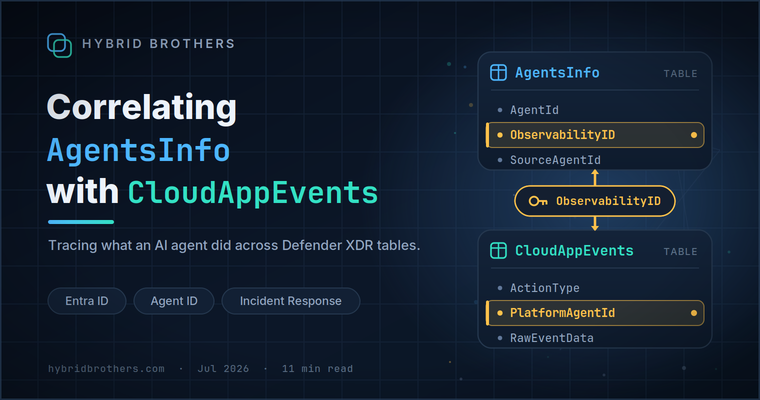
Correlating AgentsInfo with CloudAppEvents

Introduction
With the rise of AI Agents being used, organizations encounter more scenarios where they need to find out what an AI Agent exactly did in an environment. A great example of that is when an Agent has the possibility to read, write, or delete files and messages in Office 365 via AI Tools. In that case, we need to be able to easily search in Defender XDR tables for all events that specific Agent did. But is it that easy to find this? Let’s explore.
AgentsInfo Column names
The AgentsInfo table is a Defender XDR Advanced Hunting table populated by Security for AI. It contains information regarding AI agents registered from various platforms. Looking at the table schema reference, there are three columns that can be used to identify an Agent:
AgentId- Unique identifier for the agentSourceAgentId- Native identifier assigned by the platform where the agent originatedEntraAgentId- The agent’s unique enterprise application object identifier by Microsoft Entra IDObservabilityId- Unique identifier used to correlate the agent with its usage and activity data in Microsoft Agent 365
While all IDs can uniquely identify an AI Agent, you have to use the correct ID depending to the log you need to correlate the AI Agent with. One of the first interesting things I have learned is that depending on the Agent type and it’s configuration, some IDs are empty:
1AgentsInfo
2| distinct AgentId, SourceAgentId, EntraAgentID, ObservabilityID
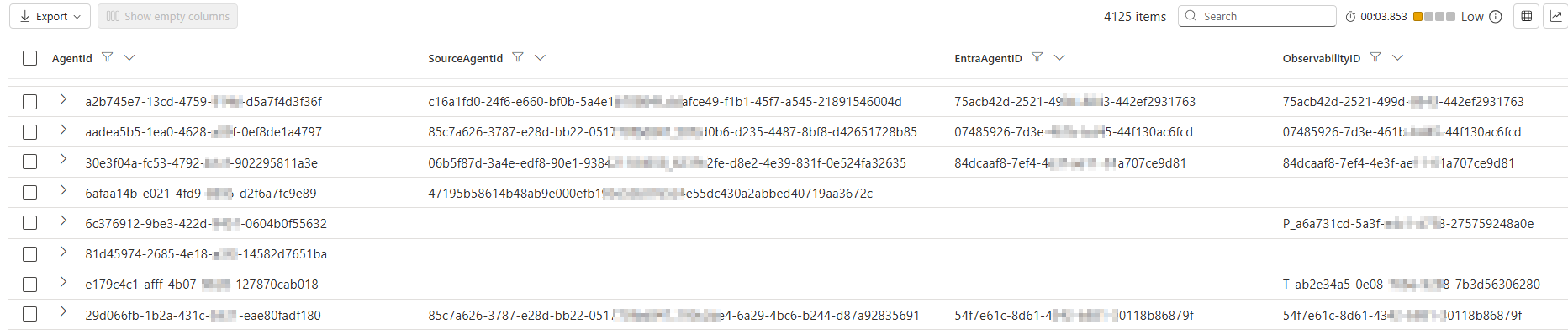
Looking at the ObservabilityId column in the AgentsInfo table, we can read that this is the ‘Unique identifier used to correlate the agent with its usage and activity data in Microsoft Agent 365’. Which is interesting, since this would mean that we can use this column to find the related activity of the Agent.
Looking at the different ObservabilityIds I could find in different environments, I noticed there always is a high amount of empty ID. After some research, I learned that a lot of these agents are local AI Agents detected by Microsoft Defender for Endpoint:

Meaning we cannot use this column directly to correlate local AI Agents with their related activity. Although there is a work-around, which we will discuss later.
Luckily, this column is available for other platform types. Although, I found that these IDs are not purely GUID-based IDs, but sometimes have some weird prefixes depending on the platform they run on. Some examples:
The Agent Builder in Microsoft 365 Copilot seem to use a T_ Prefix

Copilot Studio Agents seems to use a normal GUID

Certain third-party vendors use a P_ prefix

But right when I thought that this is not so bad, I noticed that
SharePoint Agents use an SPO_ prefix with a non-GUID ID

Because of this, we will need to do some parsing logic later in our queries to make a normalized correlation logic. More on that below.
Correlation with CloudAppEvents table
Finding the IDs
So now that we know the different ID types of the AgentsInfo table, we can try and find these IDs in other tables like the CloudAppEvents table. Right? Well, it appears not to be as easy as I thought.
So first of all, when we look at the table schema reference of the CloudAppEvents table, there is no mention of a ObservabilityId column like there was in the AgentsInfo table. While inconvenient, it is somewhat logical as well since this table logs more then only AI Agent related events.
So I decided to zoom into some events with the ActionType related to AI Agent activity. The ActionTypes used by Agent 365 can be found in this documentation page, after which I used the below query:
1CloudAppEvents
2| where ActionType in ("InvokeAgent","InferenceCall","ExecuteToolBySDK","ExecuteToolByGateway","ExecuteToolByMCPServer")
At this same documentation page, there is a mention of the different OTel properties with mappings to their columns in the RawEventData column. Meaning we can find the different IDs of the agent log using these columns:

While investigating these properties in the attribute reference, I learned that there are two properties called PlatformTargetAgentId and PlatformAgentId which can be used to identify the agents using the IDs in the source system:

And looking at these properties in the RawEventData column, I learned that these contain the ObservabilityIds from the AgentsInfo table! The only issue is, since OTel reference is a free-form text value, these fields contain more then only the ObservabilityId:

So that means we first have to extract the ObservabilityIds from these columns, before we can use them for correlation. And since the ID is or in the PlatformAgentId column or in the PlatformTargetAgentId table, we need to normalize those as well. The most reliable way I found to do this was to extract the first GUID in the string using regex (since this is also the GUID used as the ObservabilityId), and use that for correlation. But since the SPO strings are no GUIDs, we need to make an exception for those. Eventually, I came with the following KQL:
 1CloudAppEvents
 2| where ActionType in ("InvokeAgent","InferenceCall","ExecuteToolBySDK","ExecuteToolByGateway","ExecuteToolByMCPServer")
 3// Extract the platform and correlation IDs
 4| extend PlatformAgentId = tostring(parse_json(RawEventData)["PlatformAgentId"]),
 5    PlatformTargetAgentId = tostring(parse_json(RawEventData)["PlatformTargetAgentId"])
 6| distinct PlatformAgentId, PlatformTargetAgentId
 7| extend PlatformId = iff(isempty(PlatformAgentId) and isnotempty(PlatformTargetAgentId), PlatformTargetAgentId, PlatformAgentId)
 8| extend ObservabilityID = iff(
 9    PlatformId matches regex @"(\{{0,1}([0-9a-fA-F]){8}-([0-9a-fA-F]){4}-([0-9a-fA-F]){4}-([0-9a-fA-F]){4}-([0-9a-fA-F]){12}\}{0,1})",
10    extract(@"(\{{0,1}([0-9a-fA-F]){8}-([0-9a-fA-F]){4}-([0-9a-fA-F]){4}-([0-9a-fA-F]){4}-([0-9a-fA-F]){12}\}{0,1})", 1, PlatformId),
11    PlatformId
12)
13| distinct ObservabilityID
So this KQL extracts (parts) of the ObservabilityId used in the AgentsInfo table as well. In order to correlate this, we need to apply the same logic for the AgentsInfo table:
 1AgentsInfo
 2| where TimeGenerated > ago(1d)
 3| summarize arg_max(TimeGenerated, *) by AgentId
 4// Skip local AI Agents
 5| where Platform != "LocalAgents"
 6| extend ExtractedObservabilityID = iff(
 7    ObservabilityID matches regex @"(\{{0,1}([0-9a-fA-F]){8}-([0-9a-fA-F]){4}-([0-9a-fA-F]){4}-([0-9a-fA-F]){4}-([0-9a-fA-F]){12}\}{0,1})",
 8    extract(@"(\{{0,1}([0-9a-fA-F]){8}-([0-9a-fA-F]){4}-([0-9a-fA-F]){4}-([0-9a-fA-F]){4}-([0-9a-fA-F]){12}\}{0,1})", 1, ObservabilityID),
 9    ObservabilityID
10)
11| distinct ExtractedObservabilityID
But even with this logic, there is still one nuance. For some reason, some Agents in the AgentsInfo table does not have the ObservabilityID column filled in. For those, I found there is a fallback in the titleId field in RawAgentInfo which we need to take into account.
 1AgentsInfo
 2| where TimeGenerated > ago(1d)
 3| summarize arg_max(TimeGenerated, *) by AgentId
 4// Skip local AI Agents
 5| where Platform != "LocalAgents"
 6| extend ExtractedObservabilityID = iff(
 7    ObservabilityID matches regex @"(\{{0,1}([0-9a-fA-F]){8}-([0-9a-fA-F]){4}-([0-9a-fA-F]){4}-([0-9a-fA-F]){4}-([0-9a-fA-F]){12}\}{0,1})",
 8    extract(@"(\{{0,1}([0-9a-fA-F]){8}-([0-9a-fA-F]){4}-([0-9a-fA-F]){4}-([0-9a-fA-F]){4}-([0-9a-fA-F]){12}\}{0,1})", 1, ObservabilityID),
 9    ObservabilityID
10)
11// Add fallback on titleId if ObservabilityID is empty
12| extend ExtractedObservabilityID = iff(ExtractedObservabilityID == "", extract(@"(\{{0,1}([0-9a-fA-F]){8}-([0-9a-fA-F]){4}-([0-9a-fA-F]){4}-([0-9a-fA-F]){4}-([0-9a-fA-F]){12}\}{0,1})", 1, tostring(parse_json(RawAgentInfo).titleId)), ExtractedObservabilityID)
13| distinct ExtractedObservabilityID
The first correlation query
So if you have an Agent for which you want to find the related events in the CloudAppEvents table, you can use the below query:
 1// Fill in agent name
 2let agent_name = "";
 3AgentsInfo
 4| where TimeGenerated > ago(1d)
 5| summarize arg_max(TimeGenerated, *) by AgentId
 6| where Name =~ agent_name
 7// Skip local AI Agents
 8| where Platform != "LocalAgents"
 9| extend ExtractedObservabilityID = iff(
10    ObservabilityID matches regex @"(\{{0,1}([0-9a-fA-F]){8}-([0-9a-fA-F]){4}-([0-9a-fA-F]){4}-([0-9a-fA-F]){4}-([0-9a-fA-F]){12}\}{0,1})",
11    extract(@"(\{{0,1}([0-9a-fA-F]){8}-([0-9a-fA-F]){4}-([0-9a-fA-F]){4}-([0-9a-fA-F]){4}-([0-9a-fA-F]){12}\}{0,1})", 1, ObservabilityID),
12    ObservabilityID
13)
14// Add fallback on titleId if ObservabilityID is empty
15| extend ExtractedObservabilityID = iff(ExtractedObservabilityID == "", extract(@"(\{{0,1}([0-9a-fA-F]){8}-([0-9a-fA-F]){4}-([0-9a-fA-F]){4}-([0-9a-fA-F]){4}-([0-9a-fA-F]){12}\}{0,1})", 1, tostring(parse_json(RawAgentInfo).titleId)), ExtractedObservabilityID)
16| project Name, Platform, ExtractedObservabilityID
17| join kind=inner (
18    CloudAppEvents
19    | where ActionType in ("InvokeAgent","InferenceCall","ExecuteToolBySDK","ExecuteToolByGateway","ExecuteToolByMCPServer")
20    // Extract the platformIDs and ObservabilityID
21    | extend PlatformAgentId = tostring(parse_json(RawEventData)["PlatformAgentId"]),
22        PlatformTargetAgentId = tostring(parse_json(RawEventData)["PlatformTargetAgentId"])
23    | extend PlatformId = iff(isempty(PlatformAgentId) and isnotempty(PlatformTargetAgentId), PlatformTargetAgentId, PlatformAgentId)
24    | extend ObservabilityID = iff(
25        PlatformId matches regex @"(\{{0,1}([0-9a-fA-F]){8}-([0-9a-fA-F]){4}-([0-9a-fA-F]){4}-([0-9a-fA-F]){4}-([0-9a-fA-F]){12}\}{0,1})",
26        extract(@"(\{{0,1}([0-9a-fA-F]){8}-([0-9a-fA-F]){4}-([0-9a-fA-F]){4}-([0-9a-fA-F]){4}-([0-9a-fA-F]){12}\}{0,1})", 1, PlatformId),
27        PlatformId
28    )
29) on $left.ExtractedObservabilityID == $right.ObservabilityID
Extending the query to local AI Agents
Remember earlier in this blogpost when I mentioned that the ObservabilityID column in the AgentsInfo table is empty for Local AI Agents detect by Microsoft Defender for Endpoint? With some extra KQL joins, we can actually trace back the ObservabilityID which we can use to trace logs in the CloudAppEvents table again. I found in the AgentsInfo table for Local AI Agents that the SourceAgentId column is filled in. This is the Agent ID assigned by the platform the agent runs on.
1AgentsInfo
2| where Platform == "LocalAgents"
3| distinct AgentId, Name, SourceAgentId
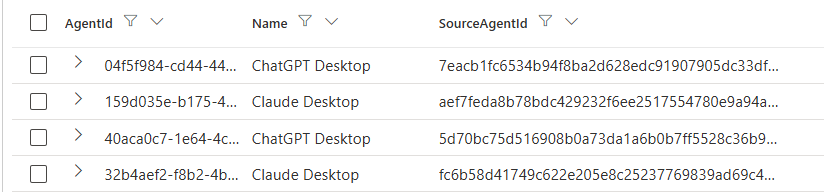
While searching through the ExposureGraphNodes table, I found out that the same ID can be used to Identify these agents here as well via the EntityIds column. And looking at this column, they added a key pair called A365RegistryAIAgentId where we can recognize the same t_ prefixes as we did before in the AgentsInfo table!
1ExposureGraphNodes
2| where NodeLabel == "ai-agent"
3| where parse_json(NodeProperties).rawData.aiAgentMetadata.platform == "LocalAgents"
4| extend SourceAIAgentId = extract("{\"type\":\"SourceAIAgentId\",\"id\":\"([^\"]+)\"}", 1, tostring(EntityIds))
5| extend A365RegistryAIAgentId = extract("{\"type\":\"A365RegistryAIAgentId\",\"id\":\"tenantid=([^;]+);titleid=([^\"]+)\"}", 2, tostring(EntityIds))

So if we extend our previous query with the ExposureGraphNodes table specifically for Local AI Agents we can search for related office activity again.
 1AgentsInfo
 2| where TimeGenerated > ago(1d)
 3| summarize arg_max(TimeGenerated, *) by AgentId
 4// Take local AI Agents
 5| where Platform == "LocalAgents"
 6| distinct Name, Platform, SourceAgentId
 7// Join with Graph Nodes to get the ObservabilityID
 8| join kind=inner (
 9    ExposureGraphNodes
10    | where NodeLabel == "ai-agent"
11    | where parse_json(NodeProperties).rawData.aiAgentMetadata.platform == "LocalAgents"
12    | extend SourceAIAgentId = extract("{\"type\":\"SourceAIAgentId\",\"id\":\"([^\"]+)\"}", 1, tostring(EntityIds))
13    | extend A365RegistryAIAgentId = extract("{\"type\":\"A365RegistryAIAgentId\",\"id\":\"tenantid=([^;]+);titleid=([^\"]+)\"}", 2, tostring(EntityIds))
14    | project SourceAIAgentId, A365RegistryAIAgentId
15) on $left.SourceAgentId == $right.SourceAIAgentId
16| extend ExtractedObservabilityID = iff(
17    A365RegistryAIAgentId matches regex @"(\{{0,1}([0-9a-fA-F]){8}-([0-9a-fA-F]){4}-([0-9a-fA-F]){4}-([0-9a-fA-F]){4}-([0-9a-fA-F]){12}\}{0,1})",
18    extract(@"(\{{0,1}([0-9a-fA-F]){8}-([0-9a-fA-F]){4}-([0-9a-fA-F]){4}-([0-9a-fA-F]){4}-([0-9a-fA-F]){12}\}{0,1})", 1, A365RegistryAIAgentId),
19    A365RegistryAIAgentId
20)
21| join kind=inner (
22    CloudAppEvents
23    | where ActionType in ("InvokeAgent","InferenceCall","ExecuteToolBySDK","ExecuteToolByGateway","ExecuteToolByMCPServer")
24    // Extract the platformIDs and ObservabilityID
25    | extend PlatformAgentId = tostring(parse_json(RawEventData)["PlatformAgentId"]),
26        PlatformTargetAgentId = tostring(parse_json(RawEventData)["PlatformTargetAgentId"])
27    | extend PlatformId = iff(isempty(PlatformAgentId) and isnotempty(PlatformTargetAgentId), PlatformTargetAgentId, PlatformAgentId)
28    | extend ObservabilityID = iff(
29        PlatformId matches regex @"(\{{0,1}([0-9a-fA-F]){8}-([0-9a-fA-F]){4}-([0-9a-fA-F]){4}-([0-9a-fA-F]){4}-([0-9a-fA-F]){12}\}{0,1})",
30        extract(@"(\{{0,1}([0-9a-fA-F]){8}-([0-9a-fA-F]){4}-([0-9a-fA-F]){4}-([0-9a-fA-F]){4}-([0-9a-fA-F]){12}\}{0,1})", 1, PlatformId),
31        PlatformId
32    )
33) on $left.ExtractedObservabilityID == $right.ObservabilityID
Correlation via a Security for AI alert
Okay, now that we know how to find the activity an agent performed by correlating AgentsInfo to CloudAppEvents, I suspect that we can easily use this starting from a Security for AI alert in Defender XDR. Right? I which it was that easy.
Below is an example of an alert stating an XPIA attack was detected on an AI Agent. In this alert we can see the details of the AI Agent, along with the AgentID:
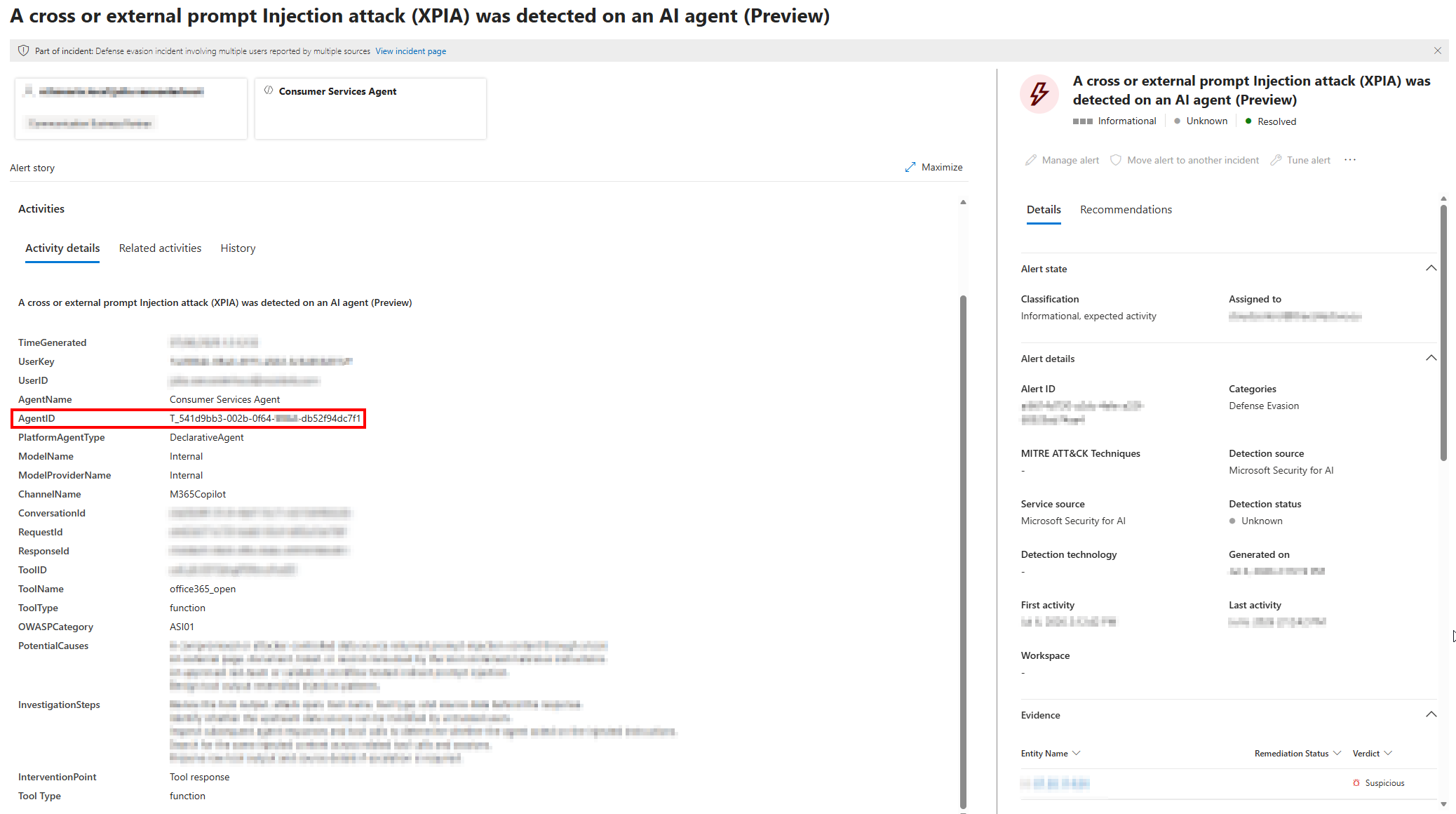
But if we search for this ID in the AgentsInfo table (and if you have read this post from the beginning you probably already know what is strange here), we can see that this is actually not the AgentID but the ObservabilityID.


So if you start from such an alert, it is always easier to do you correlation by looking for the Agent Name in the AgentsInfo table instead of blindly relying on Agent IDs. If you do want to start from an ID, keep in mind that they seem to mix up the IDs sometimes, and that you should do a broad search instead.
The final correlation queries
The latest versions of the below queries can be found at https://github.com/HybridBrothers/Hunting-Queries-Detection-Rules/tree/main/AI%20Agents
Knowing all that, we can finally conclude on the correlation queries. The below queries allow you to search for agent activity based on their name or any ID you find in a Security for AI alert.
Query for non local-agents:
 1// Fill in agent name or one of the Agent IDs you have found
 2let agent_name = "";
 3let some_agent_id = "";
 4AgentsInfo
 5| where TimeGenerated > ago(1d)
 6| summarize arg_max(TimeGenerated, *) by AgentId
 7| where (isempty(some_agent_id) and Name =~ agent_name) or (isempty(agent_name) and * has some_agent_id)
 8// Skip local AI Agents
 9| where Platform != "LocalAgents"
10| extend ExtractedObservabilityID = iff(
11    ObservabilityID matches regex @"(\{{0,1}([0-9a-fA-F]){8}-([0-9a-fA-F]){4}-([0-9a-fA-F]){4}-([0-9a-fA-F]){4}-([0-9a-fA-F]){12}\}{0,1})",
12    extract(@"(\{{0,1}([0-9a-fA-F]){8}-([0-9a-fA-F]){4}-([0-9a-fA-F]){4}-([0-9a-fA-F]){4}-([0-9a-fA-F]){12}\}{0,1})", 1, ObservabilityID),
13    ObservabilityID
14)
15// Add fallback on titleId if ObservabilityID is empty
16| extend ExtractedObservabilityID = iff(ExtractedObservabilityID == "", extract(@"(\{{0,1}([0-9a-fA-F]){8}-([0-9a-fA-F]){4}-([0-9a-fA-F]){4}-([0-9a-fA-F]){4}-([0-9a-fA-F]){12}\}{0,1})", 1, tostring(parse_json(RawAgentInfo).titleId)), ExtractedObservabilityID)
17| project Name, Platform, ExtractedObservabilityID
18| join kind=inner (
19    CloudAppEvents
20    | where TimeGenerated > ago(7d)
21    | where ActionType in ("InvokeAgent","InferenceCall","ExecuteToolBySDK","ExecuteToolByGateway","ExecuteToolByMCPServer")
22    // Extract the platformIDs and ObservabilityID
23    | extend PlatformAgentId = tostring(parse_json(RawEventData)["PlatformAgentId"]),
24        PlatformTargetAgentId = tostring(parse_json(RawEventData)["PlatformTargetAgentId"])
25    | extend PlatformId = iff(isempty(PlatformAgentId) and isnotempty(PlatformTargetAgentId), PlatformTargetAgentId, PlatformAgentId)
26    | extend ObservabilityID = iff(
27        PlatformId matches regex @"(\{{0,1}([0-9a-fA-F]){8}-([0-9a-fA-F]){4}-([0-9a-fA-F]){4}-([0-9a-fA-F]){4}-([0-9a-fA-F]){12}\}{0,1})",
28        extract(@"(\{{0,1}([0-9a-fA-F]){8}-([0-9a-fA-F]){4}-([0-9a-fA-F]){4}-([0-9a-fA-F]){4}-([0-9a-fA-F]){12}\}{0,1})", 1, PlatformId),
29        PlatformId
30    )
31) on $left.ExtractedObservabilityID == $right.ObservabilityID
Query for local agents:
 1// Fill in agent name or one of the Agent IDs you have found
 2let agent_name = "";
 3let some_agent_id = "";
 4AgentsInfo
 5| where TimeGenerated > ago(1d)
 6| summarize arg_max(TimeGenerated, *) by AgentId
 7| where (isempty(some_agent_id) and Name =~ agent_name) or (isempty(agent_name) and * has some_agent_id)
 8// Take local AI Agents
 9| where Platform == "LocalAgents"
10| distinct Name, Platform, SourceAgentId
11// Join with Graph Nodes to get the ObservabilityID
12| join kind=inner (
13    ExposureGraphNodes
14    | where NodeLabel == "ai-agent"
15    | where parse_json(NodeProperties).rawData.aiAgentMetadata.platform == "LocalAgents"
16    | extend SourceAIAgentId = extract("{\"type\":\"SourceAIAgentId\",\"id\":\"([^\"]+)\"}", 1, tostring(EntityIds))
17    | extend A365RegistryAIAgentId = extract("{\"type\":\"A365RegistryAIAgentId\",\"id\":\"tenantid=([^;]+);titleid=([^\"]+)\"}", 2, tostring(EntityIds))
18    | project SourceAIAgentId, A365RegistryAIAgentId
19) on $left.SourceAgentId == $right.SourceAIAgentId
20| extend ExtractedObservabilityID = iff(
21    A365RegistryAIAgentId matches regex @"(\{{0,1}([0-9a-fA-F]){8}-([0-9a-fA-F]){4}-([0-9a-fA-F]){4}-([0-9a-fA-F]){4}-([0-9a-fA-F]){12}\}{0,1})",
22    extract(@"(\{{0,1}([0-9a-fA-F]){8}-([0-9a-fA-F]){4}-([0-9a-fA-F]){4}-([0-9a-fA-F]){4}-([0-9a-fA-F]){12}\}{0,1})", 1, A365RegistryAIAgentId),
23    A365RegistryAIAgentId
24)
25| join kind=inner (
26    CloudAppEvents
27    | where ActionType in ("InvokeAgent","InferenceCall","ExecuteToolBySDK","ExecuteToolByGateway","ExecuteToolByMCPServer")
28    // Extract the platformIDs and ObservabilityID
29    | extend PlatformAgentId = tostring(parse_json(RawEventData)["PlatformAgentId"]),
30        PlatformTargetAgentId = tostring(parse_json(RawEventData)["PlatformTargetAgentId"])
31    | extend PlatformId = iff(isempty(PlatformAgentId) and isnotempty(PlatformTargetAgentId), PlatformTargetAgentId, PlatformAgentId)
32    | extend ObservabilityID = iff(
33        PlatformId matches regex @"(\{{0,1}([0-9a-fA-F]){8}-([0-9a-fA-F]){4}-([0-9a-fA-F]){4}-([0-9a-fA-F]){4}-([0-9a-fA-F]){12}\}{0,1})",
34        extract(@"(\{{0,1}([0-9a-fA-F]){8}-([0-9a-fA-F]){4}-([0-9a-fA-F]){4}-([0-9a-fA-F]){4}-([0-9a-fA-F]){12}\}{0,1})", 1, PlatformId),
35        PlatformId
36    )
37) on $left.ExtractedObservabilityID == $right.ObservabilityID
Conclusion
To conclude this post, I think that correlating Agents with their related activity across Defender XDR tables is at the time of writing a real challenge, because of the high amounts of different IDs and the inconsistent use of these IDs across alerts and logs.