
Improving Intune on Linux

Introduction
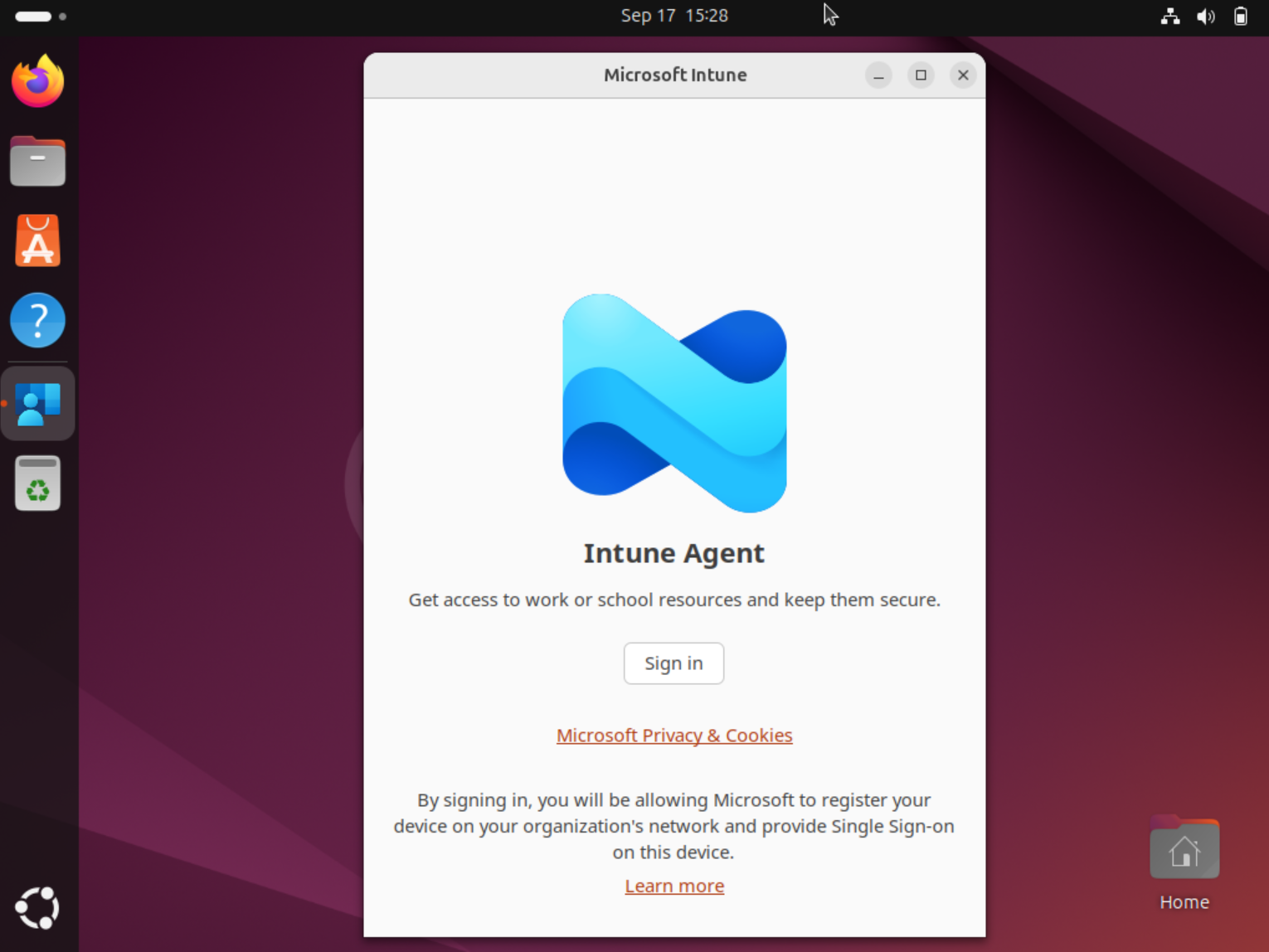
Managing Linux endpoints with Microsoft Intune has come a long way, but if you have ever rolled out the Company Portal (the intune-portal app) on Ubuntu, you have probably run into one annoying thing: the device does not check in on its own. Users have to open the app and sign in before a check-in happens, and if they do not, compliance state quietly goes stale.
In this blogpost, I want to walk through how I automated the full lifecycle of the Intune app on Ubuntu - launching it at login, getting rid of the manual sign-in click, dealing with deployments that fail on some devices, and keeping the app up to date - all pushed through Intune itself. But to be completely honest up front: the Linux Intune agent is not nearly as mature as its Windows and macOS counterparts, and a couple of the things below are unsupported shims that you take ownership of. I will flag those clearly as we go.
Everything here was tested on Ubuntu Desktop, which is the supported target for the Intune app (currently 24.04 and 26.04 LTS). Also, the scripts mentioned in the blogpost are created with AI Coding agents. While I have tested them, make sure to review them yourself as well.
How check-ins actually work on Linux
Before automating anything, it helps to understand why the check-in behaves the way it does. On Linux, the Intune app is not a single monolithic agent. It is actually three moving parts working together:
- intune-daemon - a background component that does the actual check-in work, listening on a socket at /run/intune/daemon.socket.
- microsoft-identity-broker - the piece that holds your tokens. It stores the refresh token and device certificate in the user’s keyring (the freedesktop Secret Service).
- intune-portal - the GUI you actually see. It is a thin client that talks to the daemon and the broker.

The important consequence of this design is that a check-in needs a signed-in user session with an unlocked keyring. The daemon can do its job, but only when the broker can hand it a valid token, and the broker can only do that inside a user session where the keyring is available. That is the whole reason the app does not check in “in the background” the way you would expect on Windows.
There are really two separate problems hiding in the classic “users have to open the app and log in” complaint:
- The app is not running, so nothing checks in.
- The app is running but demands a full sign-in (email, password, MFA) instead of silently refreshing.
Problem two is almost always a keyring issue - if the login keyring is not unlocked automatically at session start, the broker cannot refresh silently and falls back to a full interactive sign-in. That is worth fixing separately (make sure the login keyring password matches the account password so PAM unlocks it), but in this blogpost I want to focus on problem one and on removing the manual steps.
Launching the company portal at login
The first step is making the Company Portal start automatically, so periodic check-ins can happen without the user remembering to open it. On Ubuntu we can do this with a .desktop autostart entry:
1[Desktop Entry]
2Type=Application
3Exec=intune-portal
4Hidden=false
5X-GNOME-Autostart-enabled=true
6Name=Intune Portal
7Comment=Launch the Microsoft Intune Portal at login so device check-ins occur
Pushing this in root context
Your first instinct is to drop this file in the home directory of the logged-in user via ~/.config/autostart/. That works if you do it by hand, but it does not work when you push it through Intune, because Intune’s Linux configuration scripts run as root, non-interactively, with no logged-in user. There is no $HOME to resolve in that case.
The fix is to write to /etc/xdg/autostart/ instead, which applies system-wide to every user’s graphical session. That is actually a better fit for a managed fleet anyway. Here is the deployment script I push via Intune:
 1#!/bin/bash
 2# Deploy a system-wide autostart entry so the Microsoft Intune Portal launches
 3# at graphical session start for every user on this device.
 4#
 5# Designed for Microsoft Intune Linux platform scripts, which run as root in a
 6# non-interactive system context (no logged-in user guaranteed). For that reason
 7# we write to /etc/xdg/autostart (applies to all users) rather than a per-user
 8# ~/.config/autostart directory, which cannot be resolved here.
 9#
10# Idempotent: the file is only created if it does not already exist, so the
11# periodic re-runs Intune performs become a no-op after first deployment.
12
13set -euo pipefail
14
15AUTOSTART_DIR="/etc/xdg/autostart"
16AUTOSTART_FILE="${AUTOSTART_DIR}/intune-portal.desktop"
17
18# --- Logging + clean agent streams ------------------------------------------
19# Intune marks a Linux platform script as "Error" whenever it writes ANYTHING
20# to stderr, even on exit 0 (that is the "Error / error code 0" symptom). This
21# script has no stderr on its happy path, but mkdir/chown/chmod could emit one
22# on some systems. We funnel ALL output (stdout + stderr) into a log and leave
23# the agent's streams empty, so the status is driven by the honest exit code
24# alone. A genuine failure still exits non-zero (via set -e) and is still
25# reported as Error - we suppress noise, not real failures.
26LOG_DIR="/var/log/intune-autostart"
27mkdir -p "${LOG_DIR}" 2>/dev/null || LOG_DIR="/tmp"
28LOG_FILE="${LOG_DIR}/intune-autostart-$(date +%Y%m%d-%H%M%S).log"
29exec >>"${LOG_FILE}" 2>&1
30
31log() { echo "[$(date '+%F %T')] $*"; }
32
33log "start: user=$(id -un 2>/dev/null) uid=$(id -u) target=${AUTOSTART_FILE}"
34
35# --- Optional hardening (uncomment to enable) -------------------------------
36# Skip deployment on machines where the Intune Portal binary isn't present,
37# to avoid leaving a dangling autostart entry.
38# if ! command -v intune-portal >/dev/null 2>&1; then
39#     log "intune-portal not found on PATH; skipping autostart deployment."
40#     exit 0
41# fi
42# ---------------------------------------------------------------------------
43
44# Only deploy if the file does not already exist.
45if [[ -f "${AUTOSTART_FILE}" ]]; then
46    log "Autostart entry already present at ${AUTOSTART_FILE}; nothing to do."
47    exit 0
48fi
49
50# Ensure the target directory exists (it normally does on desktop installs).
51mkdir -p "${AUTOSTART_DIR}"
52
53# Write the desktop entry.
54cat > "${AUTOSTART_FILE}" <<'EOF'
55[Desktop Entry]
56Type=Application
57Exec=intune-portal
58Hidden=false
59X-GNOME-Autostart-enabled=true
60Name=Intune Portal
61Comment=Launch the Microsoft Intune Portal at login so device check-ins occur
62EOF
63
64# Normalise ownership and permissions.
65chown root:root "${AUTOSTART_FILE}"
66chmod 0644 "${AUTOSTART_FILE}"
67
68log "Deployed autostart entry to ${AUTOSTART_FILE}."
69exit 0
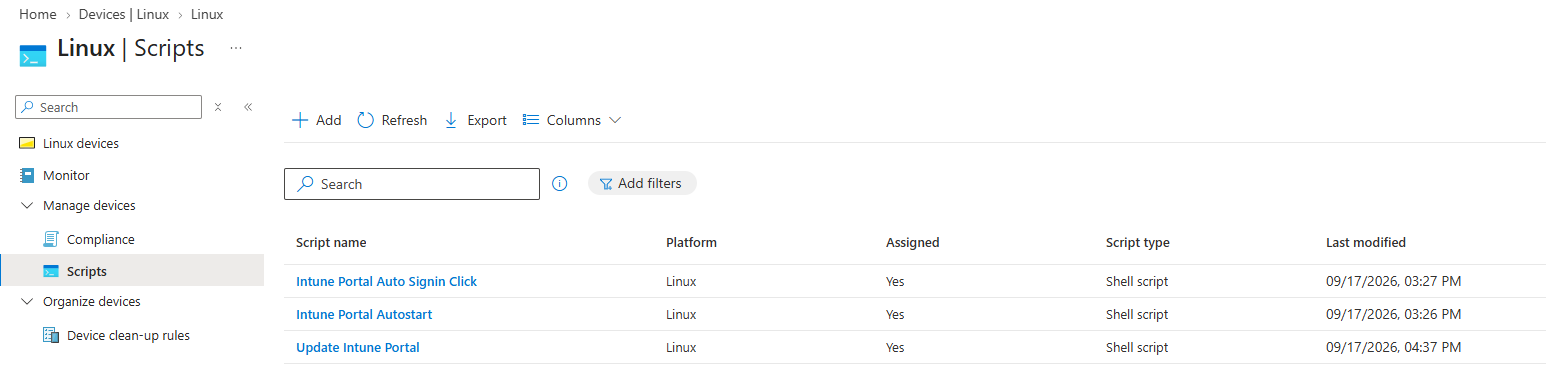
You push this as a custom configuration script under Devices > Linux > Scripts. Make sure to drop it as root.
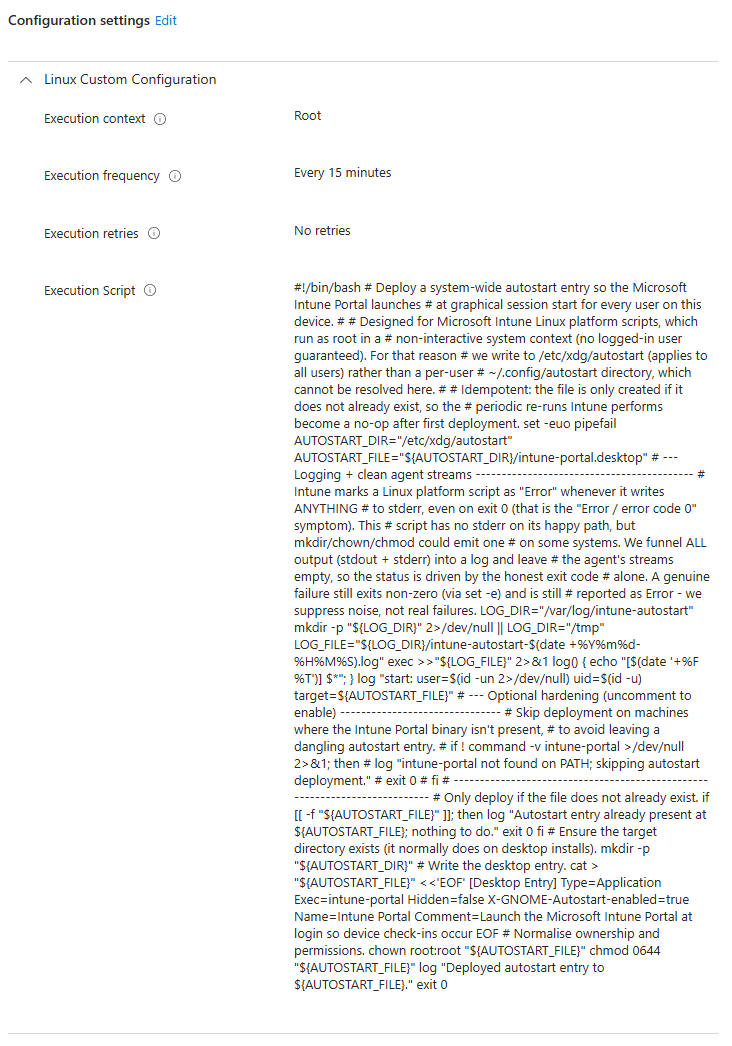
After the next login, the Company Portal launches on its own.
Automating the manual sign-in click
At this point the app opens by itself, but there is still one manual step: the user has to click Sign in. Interestingly, once you click it, the app signs in silently when the microsoft-identity-broker still has valid refresh tokens. This tells us the broker and keyring are working fine. So why is the click needed at all? Remember the three-part architecture from earlier. The daemon performs the check-in, but the token handshake that lets it do so is kicked off by the portal when you sign in. There is no documented command-line flag to auto-initiate that.
Clicking the button for the user
In order to make sure users do not click away the Intune Portal app before signing in, I (read Claude Code) created a script that automates the click. But since there is no flag that can be used using CLI, I had to automate the click using the UI inside the user’s graphical session.
This is an effective but fragile way of automating, since it is based on the UI we cannot control. If Microsoft reworks the portal UI or ships a language you did not account for, the auto sign in will stop working.
The script emulates the click in the UI through the AT-SPI accessibility tree. This is a more robust way compared to clicking a screen based on coordinates. A small Python script can walk the tree, find the “Sign in” push button by name, and invoke its accessibility action. If your users are using other languages, you can add them to the “BUTTON_NAMES” variable. The core of it looks like this:
 1import pyatspi, time
 2
 3APP_NAMES = ("intune-portal", "intune portal", "microsoft intune")
 4BUTTON_NAMES = ("sign in", "aanmelden")  # add your session language
 5
 6def find_button(node, depth=0):
 7    if node is None or depth > 40:
 8        return None
 9    if node.getRole() == pyatspi.ROLE_PUSH_BUTTON:
10        name = (node.name or "").lower()
11        if any(b in name for b in BUTTON_NAMES):
12            return node
13    for i in range(node.childCount):
14        found = find_button(node.getChildAtIndex(i), depth + 1)
15        if found:
16            return found
17    return None
18
19# ... poll the desktop for the portal app, then:
20button.queryAction().doAction(0)
By installing accerciser on your system, you can inspect the real accessibility tree on a device with the portal open. It shows you the exact name and role of the sign-in button, which is precisely what you will need to update when Microsoft changes it.
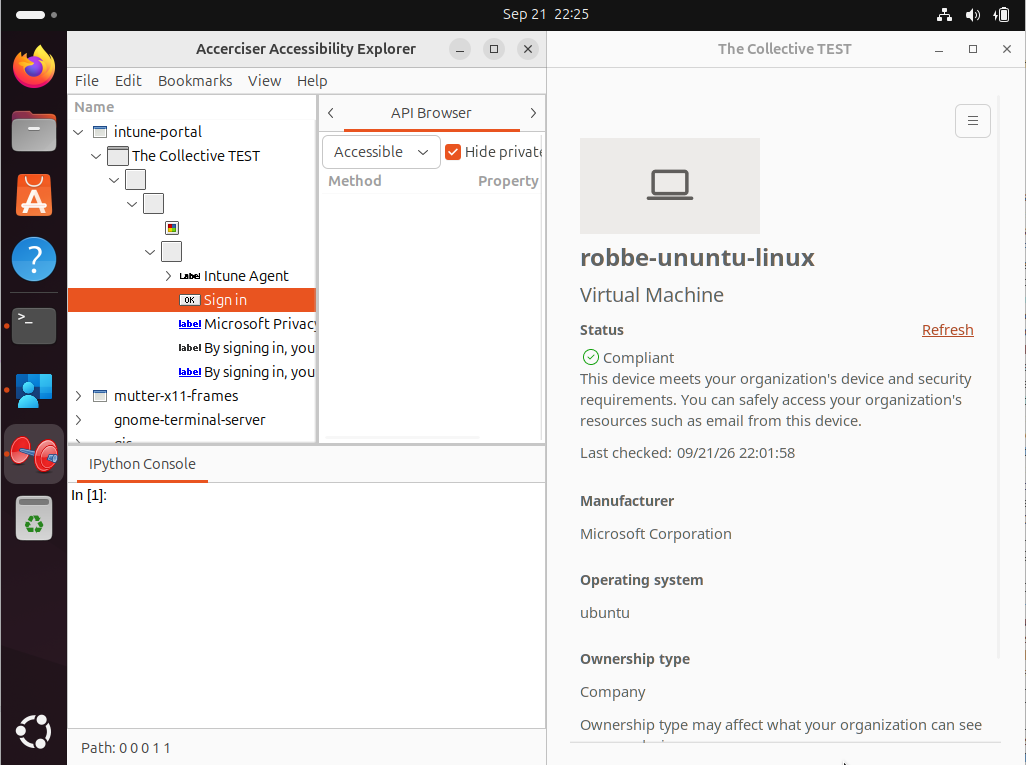
This python script can again be dropped on the systems using a wrapper via Intune, and placed under /etc/xdg/autostart. Below is the full wrapper script to be dropped via Intune:
  1#!/bin/bash
  2# Deploy an auto-sign-in shim for the Microsoft Intune Portal on Linux.
  3#
  4# WHAT THIS DOES
  5#   1. Installs the AT-SPI Python bindings (best effort).
  6#   2. Drops a helper script that, inside each user's graphical session,
  7#      finds the Intune Portal "Sign in" button via the accessibility tree
  8#      and invokes it -- removing the one manual click per login.
  9#   3. Drops a system-wide /etc/xdg/autostart entry that launches the helper.
 10#
 11# CONTEXT
 12#   Designed for Microsoft Intune Linux custom configuration scripts, which run
 13#   as root, non-interactively. The helper it installs, however, runs in the
 14#   USER graphical session (via /etc/xdg/autostart) -- GUI automation cannot run
 15#   from the root/no-session context this script executes in.
 16#
 17# DEBUG LOG
 18#   When the helper runs but does NOT end in a successful click, it writes a
 19#   per-user debug log to /tmp/intune-portal-autosignin-<uid>.log (mode 0600,
 20#   opened O_NOFOLLOW for safety in world-writable /tmp). A successful click
 21#   writes nothing and clears any stale log. On the most likely failure -- the
 22#   button label drifting -- the log dumps the buttons actually present so you
 23#   can see the real name and update BUTTON_NAMES.
 24#
 25# READ THIS FIRST
 26#   * This is an UNSUPPORTED, FRAGILE shim. It drives a GUI you don't control
 27#     and will break when Microsoft reworks the portal UI or ships it in a
 28#     language not listed in the helper's BUTTON_NAMES. You own the maintenance.
 29#   * Run the intune-daemon check first (systemctl / journalctl for the daemon
 30#     on /run/intune/daemon.socket). If the daemon keeps checking in through a
 31#     session on its own, you may not need this at all.
 32
 33set -euo pipefail
 34
 35HELPER="/usr/local/bin/intune-portal-autosignin.py"
 36AUTOSTART="/etc/xdg/autostart/intune-portal-autosignin.desktop"
 37
 38# --- 1. Dependencies (idempotent) ------------------------------------------
 39# python3-pyatspi provides the accessibility bindings; at-spi2-core provides
 40# the a11y bus. Guarded so the apt cache isn't refreshed on every re-run.
 41if ! dpkg -s python3-pyatspi >/dev/null 2>&1; then
 42    export DEBIAN_FRONTEND=noninteractive
 43    apt-get update -qq || true
 44    # Best effort: if this fails (no repo/network), the helper simply writes a
 45    # debug log and exits at runtime because pyatspi won't import -- nothing
 46    # breaks in the user session.
 47    apt-get install -y python3-pyatspi at-spi2-core || \
 48        echo "WARN: could not install python3-pyatspi; helper will no-op until it is present."
 49fi
 50
 51# --- 2. Helper script ------------------------------------------------------
 52# NOTE: unlike the autostart entry below, the helper is REWRITTEN on every run
 53# so that an updated version pushed via Intune actually propagates to devices.
 54# If you'd rather treat it as write-once, wrap this block in [[ ! -f "$HELPER" ]].
 55cat > "${HELPER}" <<'PYEOF'
 56#!/usr/bin/env python3
 57"""
 58Auto-invoke the 'Sign in' button in the Microsoft Intune Portal (Linux).
 59
 60FRAGILE SHIM -- read before relying on this:
 61  * This drives the Intune Portal GUI through the AT-SPI accessibility tree.
 62    It WILL break if Microsoft renames/reworks the button, changes the window
 63    structure, or if the UI is shown in a language not listed in BUTTON_NAMES.
 64  * Requires the AT-SPI accessibility bus (at-spi2-core) and the GTK
 65    atk-bridge, which the Intune Portal (a GTK3 app) exposes by default on a
 66    normal GNOME session. This runs in the USER graphical session ONLY.
 67  * There is no supported Microsoft method to skip the sign-in click. Prefer
 68    ripping this shim out if/when Microsoft ships real background check-in.
 69  * The script only ever *invokes* a button it can positively identify by
 70    name. If it can't find one, it exits quietly and changes nothing.
 71
 72DEBUG LOG
 73  On any run that does NOT end in a successful click, a debug log is written to
 74    /tmp/intune-portal-autosignin-<uid>.log
 75  A successful click writes no log and removes any stale one. The log is
 76  per-user (uid in the name) so multiple users on one host never collide, and
 77  it is opened with O_NOFOLLOW + mode 0600 to stay safe in world-writable /tmp.
 78  The most useful line on failure is the dump of the buttons actually present
 79  in the window -- that tells you the real label if Microsoft changed it.
 80"""
 81
 82import os
 83import sys
 84import time
 85import traceback
 86from datetime import datetime
 87
 88# --- Tunables ---------------------------------------------------------------
 89# Application name(s) as they appear in the AT-SPI tree (case-insensitive).
 90APP_NAMES = ("intune-portal", "intune portal", "microsoft intune")
 91# Candidate button labels, matched case-insensitively as substrings.
 92# Normalised to lowercase at load time so a stray capital in a future edit
 93# still matches. Add your session language here -- Dutch is "aanmelden".
 94BUTTON_NAMES = tuple(b.lower() for b in
 95                     ("sign in", "signin", "aanmelden", "log in", "login"))
 96# Wait this long (s) for the portal window to appear after the session starts.
 97APP_TIMEOUT = 120
 98# Once the app is up, wait this long (s) for the sign-in button before giving
 99# up (already signed in, or the label drifted).
100BUTTON_TIMEOUT = 25
101POLL = 2
102# Write a debug log when the app is up but no matching button is found. This is
103# the "already signed in OR label changed" case; logging it lets you tell which
104# from the button dump. Set False to keep quiet on that (expected) path.
105LOG_ON_NO_MATCH = True
106# ---------------------------------------------------------------------------
107
108LOG_PATH = "/tmp/intune-portal-autosignin-%d.log" % os.getuid()
109_BUFFER = []
110
111
112def log(msg):
113    line = "%s  %s" % (datetime.now().strftime("%Y-%m-%d %H:%M:%S"), msg)
114    _BUFFER.append(line)
115    try:  # mirror to stderr; harmless if nothing captures it
116        sys.stderr.write(line + "\n")
117    except Exception:
118        pass
119
120
121def _open_log_fd():
122    # Defensive open in world-writable /tmp: never follow a symlink someone
123    # else may have planted at our path.
124    flags = os.O_WRONLY | os.O_CREAT | os.O_TRUNC | os.O_NOFOLLOW
125    try:
126        return os.open(LOG_PATH, flags, 0o600)
127    except OSError:
128        try:  # clear a pre-existing symlink/file we can remove, then retry once
129            os.unlink(LOG_PATH)
130            return os.open(LOG_PATH, flags, 0o600)
131        except OSError:
132            return None
133
134
135def flush_failure(reason):
136    """Persist the buffered debug log to /tmp because the run failed."""
137    log("OUTCOME: FAILURE (%s)" % reason)
138    fd = _open_log_fd()
139    if fd is None:
140        sys.stderr.write("Could not open debug log at %s\n" % LOG_PATH)
141        return
142    try:
143        with os.fdopen(fd, "w") as handle:
144            handle.write("\n".join(_BUFFER) + "\n")
145        sys.stderr.write("Debug log written to %s\n" % LOG_PATH)
146    except Exception:
147        pass
148
149
150def cleanup_success():
151    """Remove any stale debug log left by a previous failed run."""
152    try:
153        if os.path.lexists(LOG_PATH):
154            os.unlink(LOG_PATH)
155    except Exception:
156        pass
157
158
159try:
160    import pyatspi
161except ImportError:
162    log("python3-pyatspi not installed; cannot run auto sign-in.")
163    flush_failure("pyatspi import failed")
164    sys.exit(0)  # never block the session
165
166
167def _lower(value):
168    return (value or "").strip().lower()
169
170
171def list_top_level(desktop):
172    """Names of all top-level accessible applications (for failure dumps)."""
173    names = []
174    try:
175        count = desktop.childCount
176    except Exception as exc:
177        return ["<error reading desktop: %s>" % exc]
178    for i in range(count):
179        try:
180            app = desktop.getChildAtIndex(i)
181            names.append(repr(getattr(app, "name", None)))
182        except Exception:
183            names.append("<error reading app %d>" % i)
184    return names
185
186
187def list_buttons(node, acc, depth=0, max_depth=40):
188    """Collect names of every push button under node (for failure dumps)."""
189    if node is None or depth > max_depth:
190        return
191    try:
192        if node.getRole() == pyatspi.ROLE_PUSH_BUTTON:
193            acc.append(repr(getattr(node, "name", None)))
194    except Exception:
195        pass
196    try:
197        count = node.childCount
198    except Exception:
199        return
200    for i in range(count):
201        try:
202            list_buttons(node.getChildAtIndex(i), acc, depth + 1, max_depth)
203        except Exception:
204            pass
205
206
207def find_app(desktop):
208    try:
209        count = desktop.childCount
210    except Exception:
211        return None
212    for i in range(count):
213        try:
214            app = desktop.getChildAtIndex(i)
215        except Exception:
216            continue
217        name = _lower(getattr(app, "name", ""))
218        if name and any(a in name or name in a for a in APP_NAMES):
219            return app
220    return None
221
222
223def find_sign_in_button(node, depth=0, max_depth=40):
224    """Depth-first search for a visible, sensitive push button by name."""
225    if node is None or depth > max_depth:
226        return None
227    try:
228        role = node.getRole()
229    except Exception:
230        return None
231
232    if role == pyatspi.ROLE_PUSH_BUTTON:
233        name = _lower(getattr(node, "name", ""))
234        if name and any(b in name for b in BUTTON_NAMES):
235            try:
236                state = node.getState()
237                if state.contains(pyatspi.STATE_SHOWING) and \
238                   state.contains(pyatspi.STATE_SENSITIVE):
239                    return node
240            except Exception:
241                return node  # states unavailable; take the name match
242
243    try:
244        count = node.childCount
245    except Exception:
246        count = 0
247    for i in range(count):
248        try:
249            child = node.getChildAtIndex(i)
250        except Exception:
251            continue
252        found = find_sign_in_button(child, depth + 1, max_depth)
253        if found is not None:
254            return found
255    return None
256
257
258def invoke(button):
259    """Invoke the button's default action via the AT-SPI Action interface."""
260    try:
261        action = button.queryAction()
262    except Exception:
263        return False
264    preferred = ("click", "press", "activate", "invoke")
265    idx = 0
266    try:
267        for i in range(action.nActions):
268            if _lower(action.getName(i)) in preferred:
269                idx = i
270                break
271    except Exception:
272        idx = 0
273    try:
274        action.doAction(idx)
275        return True
276    except Exception:
277        return False
278
279
280def main():
281    log("Starting (uid=%d, pid=%d)." % (os.getuid(), os.getpid()))
282    log("Session: XDG_SESSION_TYPE=%s DISPLAY=%s WAYLAND_DISPLAY=%s" % (
283        os.environ.get("XDG_SESSION_TYPE"),
284        os.environ.get("DISPLAY"),
285        os.environ.get("WAYLAND_DISPLAY")))
286
287    try:
288        desktop = pyatspi.Registry.getDesktop(0)
289    except Exception as exc:
290        log("AT-SPI desktop unavailable: %s" % exc)
291        flush_failure("AT-SPI unavailable")
292        sys.exit(0)
293
294    # Phase 1: wait for the portal window to appear.
295    app = None
296    deadline = time.time() + APP_TIMEOUT
297    while time.time() < deadline:
298        app = find_app(desktop)
299        if app is not None:
300            break
301        time.sleep(POLL)
302    if app is None:
303        log("Intune Portal window did not appear within %ds." % APP_TIMEOUT)
304        log("Top-level applications seen: %s" % ", ".join(list_top_level(desktop)))
305        flush_failure("portal window never appeared")
306        sys.exit(0)
307
308    log("Found portal application: %r" % getattr(app, "name", None))
309
310    # Phase 2: wait for the sign-in button, then invoke it once.
311    deadline = time.time() + BUTTON_TIMEOUT
312    while time.time() < deadline:
313        button = find_sign_in_button(app)
314        if button is not None:
315            log("Matched sign-in button: %r" % getattr(button, "name", None))
316            if invoke(button):
317                log("Sign-in button invoked successfully.")
318                cleanup_success()
319                sys.exit(0)
320            log("Found sign-in button but AT-SPI action failed.")
321            flush_failure("button found but invoke failed")
322            sys.exit(0)
323        time.sleep(POLL)
324
325    # App up, no matching button: already signed in, or the label changed.
326    buttons = []
327    list_buttons(app, buttons)
328    if buttons:
329        log("No sign-in button matched. Push buttons present: %s"
330            % ", ".join(buttons))
331    else:
332        log("No push buttons present in the portal window.")
333    log("Expected if already signed in; otherwise the real label is above.")
334    if LOG_ON_NO_MATCH:
335        flush_failure("no matching sign-in button")
336    else:
337        cleanup_success()
338    sys.exit(0)
339
340
341if __name__ == "__main__":
342    try:
343        main()
344    except SystemExit:
345        raise
346    except Exception:
347        log("Unhandled exception:\n%s" % traceback.format_exc())
348        flush_failure("unhandled exception")
349        sys.exit(0)
350PYEOF
351chown root:root "${HELPER}"
352chmod 0755 "${HELPER}"
353
354# --- 3. Autostart entry (only if absent) -----------------------------------
355# 'sh -c' first enables the GTK toolkit accessibility bridge for the session
356# (harmless if already on), then launches the helper. Runs after the portal's
357# own autostart; the helper polls for the window so ordering doesn't matter.
358if [[ ! -f "${AUTOSTART}" ]]; then
359    cat > "${AUTOSTART}" <<'DESKTOPEOF'
360[Desktop Entry]
361Type=Application
362Name=Intune Portal Auto Sign-in
363Comment=Invokes the Intune Portal sign-in button so device check-ins occur
364Exec=sh -c "gsettings set org.gnome.desktop.interface toolkit-accessibility true 2>/dev/null; exec /usr/local/bin/intune-portal-autosignin.py"
365Hidden=false
366X-GNOME-Autostart-enabled=true
367DESKTOPEOF
368    chown root:root "${AUTOSTART}"
369    chmod 0644 "${AUTOSTART}"
370    echo "Deployed autostart entry to ${AUTOSTART}."
371else
372    echo "Autostart entry already present at ${AUTOSTART}; left untouched."
373fi
374
375echo "Auto-sign-in shim deployment complete."
376exit 0
By now, you should have two auto start files under /etc/xdg/autostart:
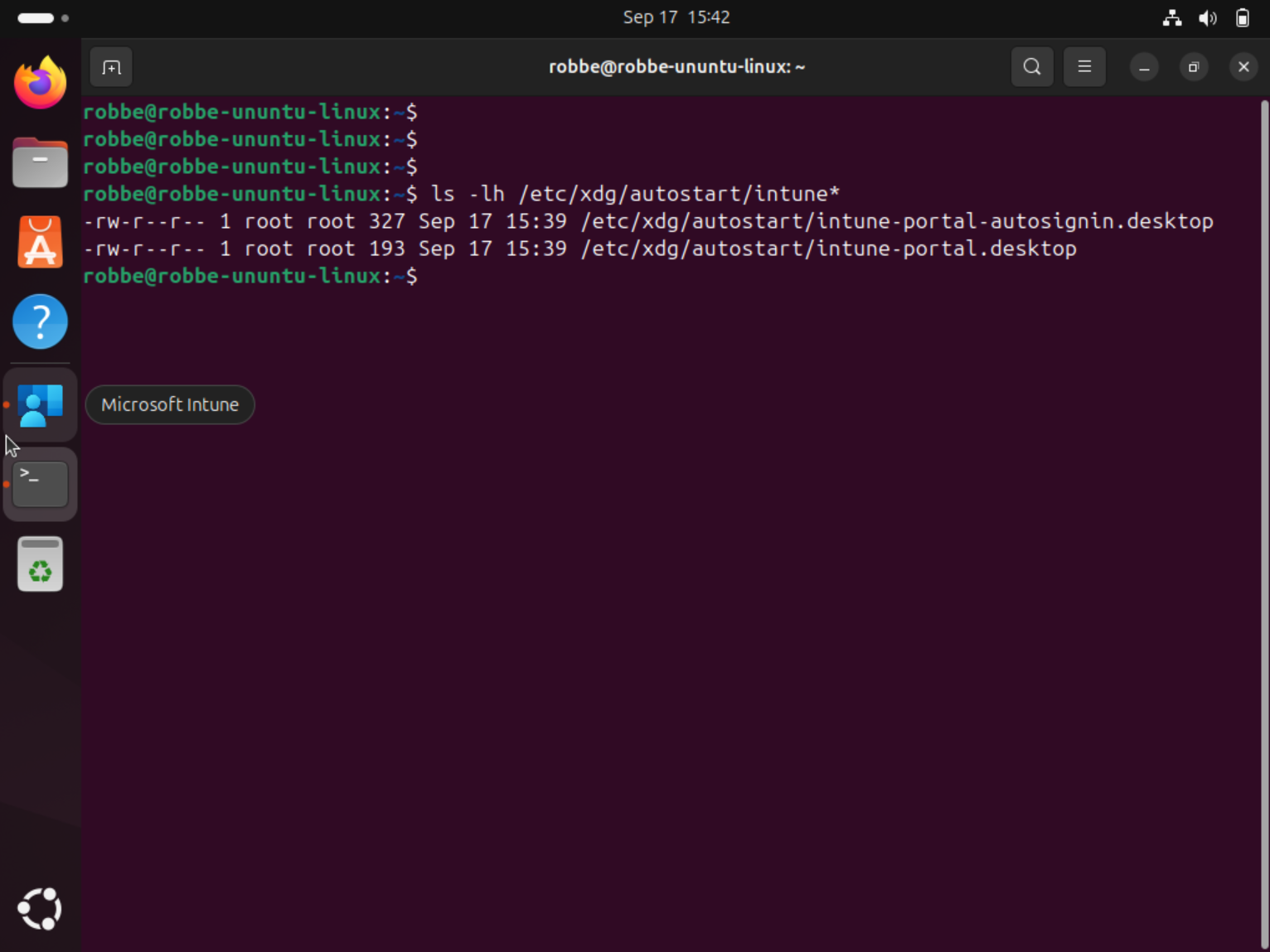
After signing into the system, the Intune Portal will now start automatically and click the sign-in button without any user interaction:
Keeping the Intune app up-to-date
Last piece: keeping intune-portal current. The app is not in Ubuntu’s repositories - it comes from packages.microsoft.com and updates via apt. Microsoft’s guidance points at the Software Updater, but that is interactive, and unattended-upgrades by default only touches Ubuntu’s own security packages, so the app never updates on its own unless you tell it to.
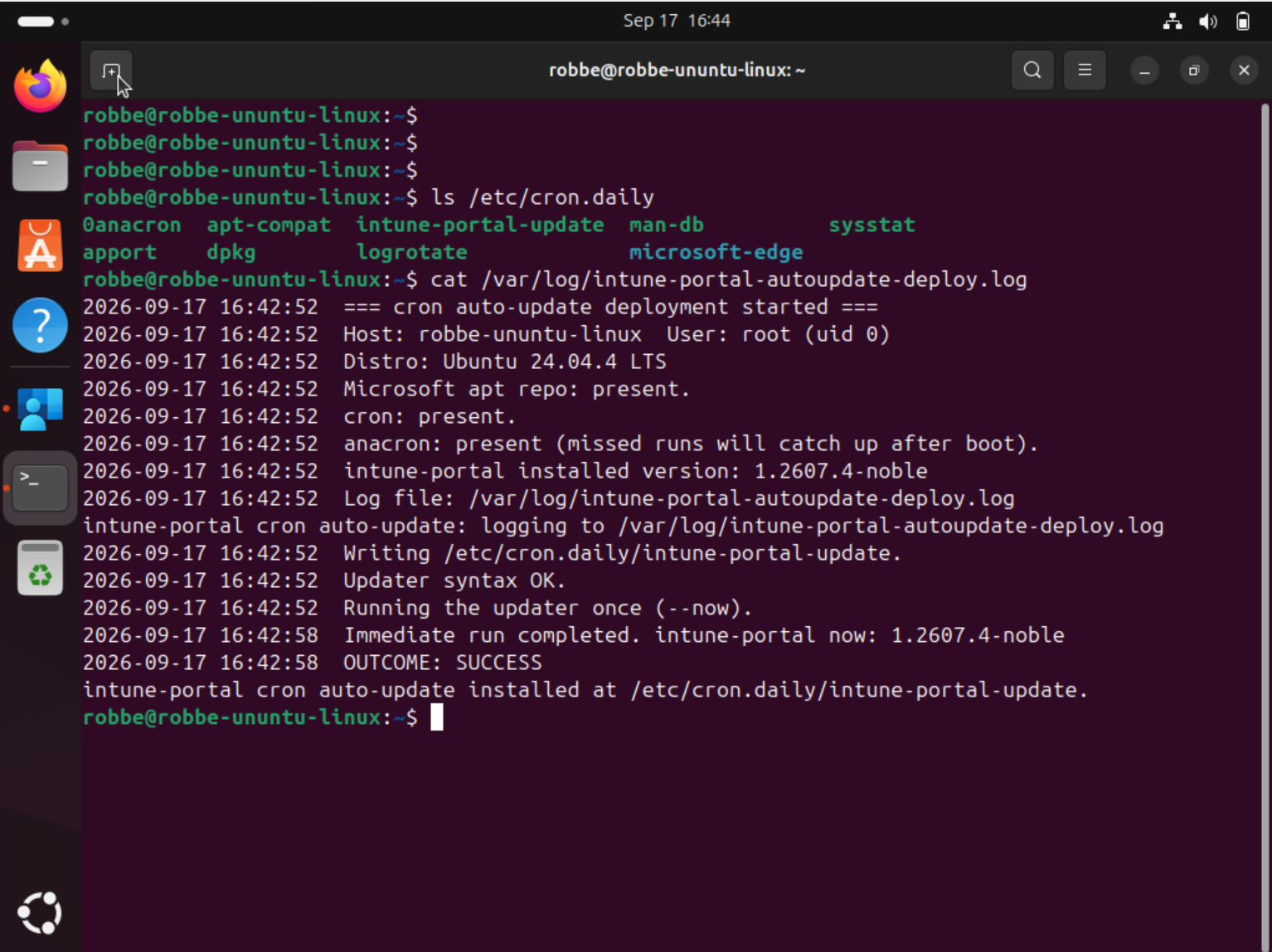
You can wire the Microsoft repo into unattended-upgrades, but honestly, for this I went with the simpler, more transparent option: a cron job. The one nuance worth calling out is that these are laptops, and a fixed-time crontab entry (say 3:30 in the morning) simply never fires on a machine that is asleep or off at that moment. So instead of /etc/cron.d with a hardcoded time, I drop the updater into /etc/cron.daily/, which runs through anacron and catches up shortly after the next boot if a run was missed.
My deployment script drops that updater, makes it executable, and runs it once immediately so you do not have to wait a day for the first cycle. After that, cron carries it.
  1#!/bin/bash
  2# Keep the Microsoft Intune app (intune-portal) auto-updated on Linux -- the
  3# simple cron way. Installs an updater at /etc/cron.daily/intune-portal-update
  4# and runs it once immediately.
  5#
  6# For Microsoft Intune Linux platform scripts (run as root, non-interactively).
  7#
  8# WHY cron.daily (and not /etc/cron.d with a fixed time):
  9#   These are desktops/laptops. A fixed-time crontab line never fires on a
 10#   machine that's off or asleep at that moment. /etc/cron.daily runs via
 11#   anacron, which CATCHES UP shortly after the next boot if a run was missed
 12#   -- so the update actually happens on laptops. (If your fleet is always-on
 13#   servers and you want a specific time instead, see the /etc/cron.d note at
 14#   the bottom of this file.)
 15#
 16# FILENAME GOTCHA: run-parts (which executes /etc/cron.daily) ignores files
 17#   whose names contain a dot. The updater is therefore named
 18#   "intune-portal-update" with NO .sh extension, and must be executable.
 19#
 20# DIAGNOSTIC LOG -> /var/log/intune-portal-autoupdate-deploy.log (or /tmp).
 21#   The updater itself logs its activity separately to
 22#   /var/log/intune-portal-update.log.
 23#
 24# INTUNE STDERR NOTE: Intune marks a Linux platform script as "Error" if it
 25#   writes ANYTHING to stderr, even on exit 0. After the log path is chosen we
 26#   redirect the whole process (stdout + stderr) into the log, so the agent
 27#   sees clean streams and the status is driven by the honest exit code alone.
 28#   A genuine failure still exits non-zero and is still (correctly) reported as
 29#   Error -- we suppress noise, not real failures.
 30
 31DAILY_PATH="/etc/cron.daily/intune-portal-update"
 32SOURCES_DIR="/etc/apt/sources.list.d"
 33
 34# --- Choose a writable log path (before strict mode) ------------------------
 35LOG_FILE="/var/log/intune-portal-autoupdate-deploy.log"
 36if ! ( : >> "${LOG_FILE}" ) 2>/dev/null; then
 37    LOG_FILE="/tmp/intune-portal-autoupdate-deploy.log"
 38fi
 39: > "${LOG_FILE}" 2>/dev/null || true
 40
 41# --- Clean agent streams: everything from here goes to the log --------------
 42# Must come after LOG_FILE is finalised and before any output is produced.
 43exec >>"${LOG_FILE}" 2>&1
 44
 45log() {
 46    printf '%s  %s\n' "$(date '+%Y-%m-%d %H:%M:%S')" "$*" >> "${LOG_FILE}" 2>/dev/null || true
 47}
 48
 49# --- Environment snapshot (before set -e / trap) ----------------------------
 50log "=== cron auto-update deployment started ==="
 51log "Host: $(hostname 2>/dev/null || echo '?')  User: $(id -un 2>/dev/null || echo '?') (uid $(id -u 2>/dev/null || echo '?'))"
 52if [ -r /etc/os-release ]; then
 53    # shellcheck disable=SC1091
 54    . /etc/os-release 2>/dev/null || true
 55    log "Distro: ${PRETTY_NAME:-unknown}"
 56fi
 57if grep -rqsI packages.microsoft.com "${SOURCES_DIR}" /etc/apt/sources.list 2>/dev/null; then
 58    log "Microsoft apt repo: present."
 59else
 60    log "Microsoft apt repo: NOT FOUND -- intune-portal cannot update until the"
 61    log "  packages.microsoft.com repo exists (it normally does on enrolled devices)."
 62fi
 63# cron/anacron presence: without cron, the daily job never runs.
 64if command -v cron >/dev/null 2>&1 || command -v crond >/dev/null 2>&1 || dpkg -s cron >/dev/null 2>&1; then
 65    log "cron: present."
 66else
 67    log "cron: NOT FOUND -- the daily job will not run until cron is installed."
 68fi
 69if command -v anacron >/dev/null 2>&1 || dpkg -s anacron >/dev/null 2>&1; then
 70    log "anacron: present (missed runs will catch up after boot)."
 71else
 72    log "anacron: not found -- cron.daily still runs, but WITHOUT catch-up, so a"
 73    log "  machine off at the scheduled time skips that day. Consider installing anacron."
 74fi
 75log "intune-portal installed version: $(dpkg-query -W -f='${Version}' intune-portal 2>/dev/null || echo 'not installed')"
 76log "Log file: ${LOG_FILE}"
 77echo "intune-portal cron auto-update: logging to ${LOG_FILE}"
 78
 79# --- Strict mode + failure trap for the durable work ------------------------
 80# Note: the trap logs and exits non-zero. It intentionally does NOT write to
 81# stderr -- the non-zero exit is what tells Intune this run failed.
 82on_err() {
 83    local rc=$?
 84    local line="$1"
 85    log "ERROR rc=${rc} at line ${line}: ${BASH_COMMAND}"
 86    log "OUTCOME: FAILED"
 87    exit "${rc}"
 88}
 89trap 'on_err "${LINENO}"' ERR
 90set -euo pipefail
 91
 92# --- Write the daily updater (MUST succeed; overwritten each run) ------------
 93log "Writing ${DAILY_PATH}."
 94mkdir -p "$(dirname "${DAILY_PATH}")"
 95cat > "${DAILY_PATH}" <<'DAILYEOF'
 96#!/bin/bash
 97# Update the Microsoft Intune app (intune-portal) from packages.microsoft.com.
 98# Installed by Intune. Run daily by cron/anacron (with boot catch-up).
 99# Pass --now to skip the random jitter (used for the immediate post-deploy run).
100
101set -uo pipefail
102
103LOG_FILE="/var/log/intune-portal-update.log"
104MAX_LOG_BYTES=1048576     # rotate at ~1 MB, keeping one previous file
105JITTER_MAX=1800           # spread fleet load: sleep 0..JITTER_MAX s (0 disables)
106
107log() { printf '%s  %s\n' "$(date '+%Y-%m-%d %H:%M:%S')" "$*" >> "${LOG_FILE}" 2>/dev/null || true; }
108
109# Bounded log: rotate once when it gets large.
110if [ -f "${LOG_FILE}" ] && [ "$(stat -c%s "${LOG_FILE}" 2>/dev/null || echo 0)" -gt "${MAX_LOG_BYTES}" ]; then
111    mv -f "${LOG_FILE}" "${LOG_FILE}.1" 2>/dev/null || true
112fi
113
114# Random jitter so a fleet doesn't hit the repo simultaneously (skip with --now).
115if [ "${1:-}" != "--now" ] && [ "${JITTER_MAX}" -gt 0 ]; then
116    sleep $(( RANDOM % JITTER_MAX ))
117fi
118
119export DEBIAN_FRONTEND=noninteractive
120before="$(dpkg-query -W -f='${Version}' intune-portal 2>/dev/null || echo 'not installed')"
121log "=== update run (current: ${before}) ==="
122
123# apt-get writes progress/warnings to stderr even on success; keep all of it in
124# this log so nothing leaks to the caller (the immediate run is invoked by the
125# Intune deploy script, and stray stderr there would flag the policy as Error).
126if ! /usr/bin/apt-get update -qq >>"${LOG_FILE}" 2>&1; then
127    log "WARN: apt-get update failed; will retry next run."
128    exit 0
129fi
130
131if /usr/bin/apt-get install --only-upgrade -y intune-portal >>"${LOG_FILE}" 2>&1; then
132    after="$(dpkg-query -W -f='${Version}' intune-portal 2>/dev/null || echo '?')"
133    if [ "${before}" = "${after}" ]; then
134        log "Already current (${after})."
135    else
136        log "Upgraded ${before} -> ${after}."
137    fi
138else
139    log "WARN: upgrade failed; will retry next run."
140fi
141exit 0
142DAILYEOF
143chmod 0755 "${DAILY_PATH}"
144chown root:root "${DAILY_PATH}"
145
146# Sanity-check the updater parses before we rely on it.
147if bash -n "${DAILY_PATH}" 2>>"${LOG_FILE}"; then
148    log "Updater syntax OK."
149else
150    log "ERROR: updater failed syntax check; removing it."
151    rm -f "${DAILY_PATH}"
152    false   # trip the trap -> report failure instead of shipping a broken job
153fi
154
155# --- Run it once now (best effort, never fatal) -----------------------------
156log "Running the updater once (--now)."
157if "${DAILY_PATH}" --now; then
158    log "Immediate run completed. intune-portal now: $(dpkg-query -W -f='${Version}' intune-portal 2>/dev/null || echo '?')"
159else
160    log "WARN: immediate run returned non-zero (non-fatal); the daily job will retry."
161fi
162
163log "OUTCOME: SUCCESS"
164echo "intune-portal cron auto-update installed at ${DAILY_PATH}."
165exit 0
166
167# ---------------------------------------------------------------------------
168# ALTERNATIVE for always-on servers wanting a fixed time instead of cron.daily:
169# drop /etc/cron.d/intune-portal-autoupdate (filename must have NO dot) with a
170# trailing newline, containing:
171#
172#   SHELL=/bin/bash
173#   PATH=/usr/sbin:/usr/bin:/sbin:/bin
174#   MAILTO=""
175#   30 3 * * * root /usr/local/bin/intune-portal-update.sh
176#
177# (move the updater to /usr/local/bin/intune-portal-update.sh in that case).
178# cron picks up /etc/cron.d changes automatically; no reload needed. Downside:
179# no catch-up, so a machine off at 03:30 skips that day.
180# ---------------------------------------------------------------------------
When the deployment succeeds, you should find it as below:
Conclusion
With the pieces above, you can take Intune on Linux from “the user has to remember to open the app and sign in” to a device that launches the Company Portal at login, signs in on its own, and keeps itself updated - all deployed and managed from Intune.
That said, I want to end on the same honest note I started with. A couple of these steps, especially the auto sign-in, are unsupported shims against an app that ships monthly, so treat them as something you maintain rather than set-and-forget. Microsoft is actively improving the Linux agent, and I would happily throw all of this away the day a proper background check-in lands. Until then, this is what keeps my Linux fleet reporting reliably.